Property Management Automation: What to Automate First
On this page
Automate the high-volume, low-judgment work first: request intake, routing, reminders, and status updates. This work repeats constantly, follows clear rules, and buries your teams without needing their judgment — so it returns hours fast and carries almost no risk. Build each workflow by describing it in plain language, on your own data, and keep it yours to change.
It's Tuesday. Two techs called out, the regional wants a portfolio walk by Thursday, and the shared inbox has 40-odd messages that nobody has sorted yet. Half are duplicate work-order requests, a handful are genuinely urgent, and three are residents who emailed on Friday and still haven't heard back. Your community manager is going to spend the first two hours of the day just figuring out what's in the pile before a single problem gets solved.
That is the real starting point for property management automation. Not a dashboard, not a strategy deck — the pile. And the good news is that most of what's in it is exactly the kind of work a machine should have handled before anyone sat down. You don't have to automate everything to feel relief. You have to automate the right things first.
What should you automate first in property management?
Start with work that is high-volume and low-judgment. That combination is the whole trick. High-volume means it happens constantly, so even a small time savings per instance adds up to real hours. Low-judgment means the rules are clear enough that you'd be comfortable letting a well-trained new hire handle it — which means you'd be comfortable letting software handle it too.
Four categories fit that description in almost every portfolio:
- Intake. Turning inbound requests — emails, calls, portal messages, texts — into structured, categorized items. No more re-reading the same message three times to figure out what it is.
- Routing. Getting each item to the right person or team the first time. Maintenance to maintenance, a lease question to leasing, an escalation to the regional — automatically, based on what the request actually says.
- Reminders and follow-ups. The nudges that fall through the cracks when a property is short-staffed: the renewal follow-up, the "did this get resolved" check, the vendor who said they'd call back.
- Status updates. Telling the resident their request was received, is in progress, is done — without a human writing the same three sentences forty times a day.
Skip, for now, the work that genuinely needs a person: the judgment call on a difficult resident, the exception nobody planned for, the decision that carries real money or real risk. Automating those first is how automation projects earn a bad name. Earn trust on the boring, repetitive volume, then expand.
Why high-volume, low-judgment work is the safest place to start
There's a reason this order matters beyond just time savings. When you automate low-judgment work, the cost of getting it slightly wrong is low. If an intake rule miscategorizes a message in week one, you notice, you adjust, and no one gets hurt. That's a very different bet than handing a machine a decision that affects a lease or a resident relationship on day one.
It's also where the hours actually are. When operators map where their on-site teams' time goes, the surprise is never the hard, interesting problems — those are rare. It's the sheer volume of small, repetitive handling: sorting, forwarding, acknowledging, chasing. That's the water your teams are swimming in. Drain it, and you get people back for the work that needs a human. Travtus operators typically see around a 15% productivity gain from this alone, and it shows up first as teams who aren't drowning by 10 a.m.
And when the low-judgment work runs itself, response times get faster and more consistent — which is quietly one of the biggest drivers of resident retention. People don't leave because you sorted their email slowly; they leave because "ignored" adds up. Removing that friction protects NOI through the cost side and the retention side at once, without touching a single thing about how you price or lease.
How do you build these workflows without a developer?
Here's the part that changed my mind about automation. For years, "automate that" meant a request to IT, a spot in someone's backlog, and a six-week wait for a workflow that didn't quite match how the work actually happens on-site. So nobody bothered, and the pile stayed.
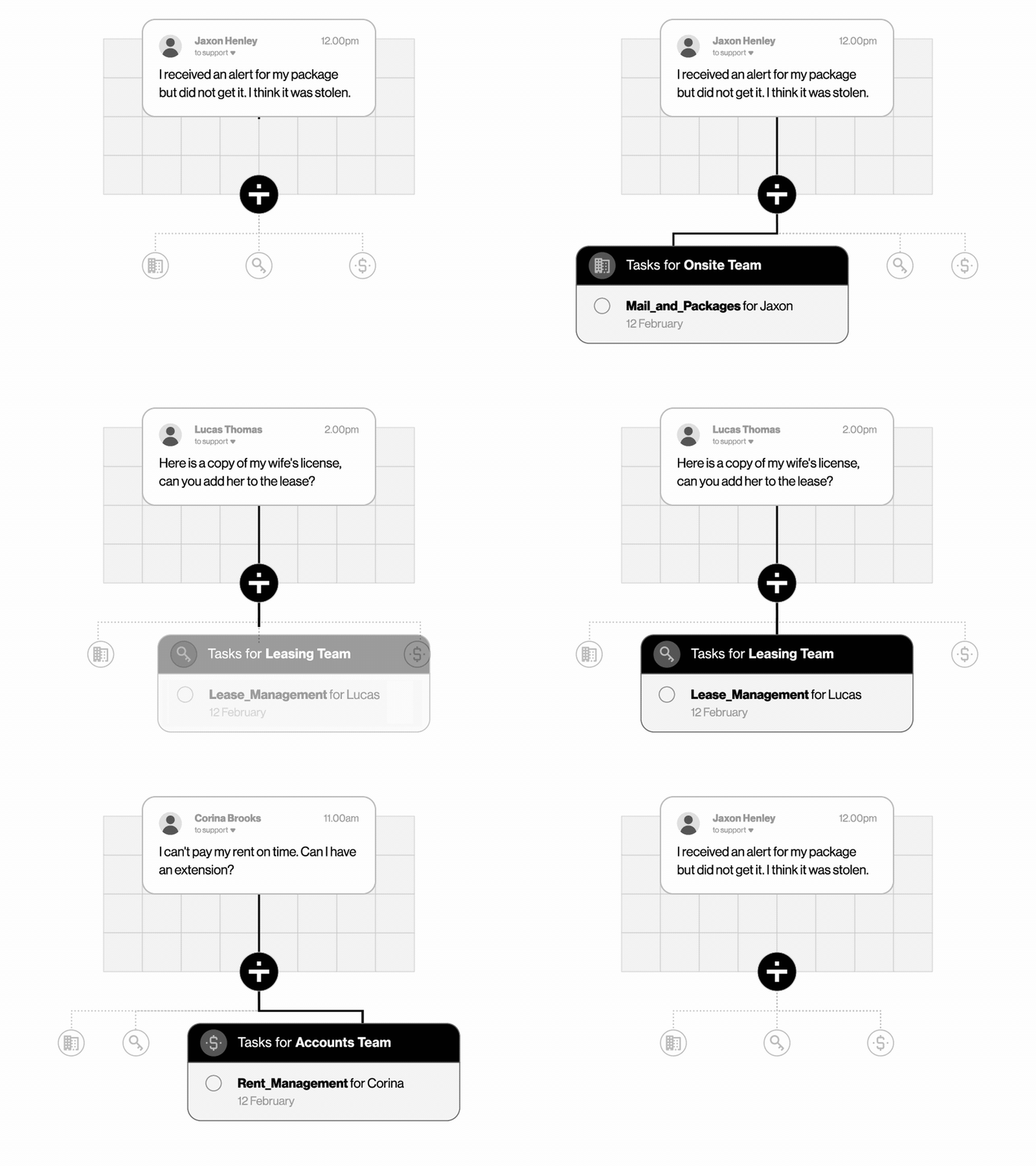
On a modern platform, you build a workflow by describing it. You say, in plain language: when a maintenance request comes in, categorize it, route it to the on-site team, acknowledge the resident, and flag anything marked urgent to the community manager. The platform builds it. No code, no ticket, no waiting on a developer who's never covered a property short-staffed.
That matters for a reason beyond speed. The person who knows the process is the person who builds it — and can change it the moment the process changes. On Travtus, the automation you build runs on your data, and the logic stays yours to adjust. It's not a black box some vendor owns. It's yours to build, and yours to fix at 4 p.m. on a Tuesday when the process shifts. That ownership is what keeps automation useful a year later instead of stale.
What "best AI for multifamily operational efficiency" actually means
When operators ask me for the best AI for multifamily operational efficiency, they're usually expecting a single-tool recommendation. But a point tool automates one task; it doesn't change how the company operates. You end up with a dozen disconnected tools, each handling a sliver, none of them talking to each other — and you've just moved the coordination problem, not solved it.
The better answer is range: one platform that connects to the systems you already run, works across intake, routing, reminders, and status, and grows as you find the next thing worth automating. It should layer onto Yardi, RealPage, Entrata, or AppFolio — not replace them. Owner-operators like Cortland, MAA, BH, Continental, and Preiss don't rip out their system of record to get efficiency; they build on top of it. That's the difference between an efficiency project that stalls at a pilot and one that becomes how the whole portfolio runs.
How Travtus approaches this
Travtus is built to automate the exact pile that buries your teams — and to let operators build it themselves. The Everyday AI™ Platform follows a simple path: Connect to your existing systems, Explore your data, Create the primitives you need, and Act. You build primitives — Reports, Profiles, Scores, and Workflows — by describing them in plain language, on your own data, with your IP staying yours. No rip-and-replace of Yardi, RealPage, Entrata, or AppFolio.
Start with the high-volume, low-judgment work, prove the hours back, then expand across the portfolio — the practical route to becoming an AI-native housing enterprise on one platform. For the bigger picture on pulling scattered work into one place, see Centralization and the Operations & Efficiency hub, or the deeper guides on how to hyper-automate your residential operations and centralize and platform vs. point solutions.
Frequently asked questions
What should you automate first in property management? Start with high-volume, low-judgment work: request intake, routing to the right team, reminders and follow-ups, and status updates. This work repeats constantly, follows clear rules, and eats hours without needing human judgment — so automating it returns time fast and carries almost no risk if you get it slightly wrong at first.
What is the best AI for multifamily operational efficiency? The best fit is a platform that works across your existing systems rather than a single-task point tool. Look for one that connects to your data, lets you build workflows by describing them in plain language, and layers onto Yardi, RealPage, Entrata, or AppFolio without a rip-and-replace. That range is what compounds into real efficiency.
Do you need to replace your property management system to automate? No. Modern platforms sit on top of your system of record — Yardi, RealPage, Entrata, AppFolio — and read from it rather than replace it. You keep the system your teams already know and add automation across it. Rip-and-replace is slow, risky, and usually unnecessary to start returning hours.
How do you build a workflow without writing code? You describe the outcome you want in plain language — the trigger, the steps, who gets notified, what gets logged — and the platform builds the workflow. No scripting, no developer backlog. An operator who knows the process can build and adjust it directly, which is why the work you automate stays yours to change.
How much of the work can automation actually handle? For well-scoped, repetitive workflows, automation can handle the vast majority of the volume end to end, with people stepping in only on the exceptions. Operators on the Travtus platform see roughly 95% workflow automation on the flows they build, freeing teams to spend their judgment where it matters.
See what's worth automating first with Workflows you build by describing them — then book a demo.